

Google Gemini Nano Banana: Full Guide 2025

Google introduced a powerful AI tool called Google Gemini Nano Banana in 2025, with which you can create and edit images using various text prompts.
The tool can also change backgrounds, clothes, and hairstyles, and combine various images. It can be used on Android and iOS through the Gemini app.
How Do You access the Gemini Nano Banana API?
It is very easy to use. The first step is to get an API key. By following the steps of the API Key Guide, you can obtain an API key.
In the official documentation provided by Google, detailed information is provided on how to use the API. You can check how to give the prompts and receive image responses. ((Google API Docs))
With the Google AI Studio, you can use various Gemini models like Nano Banana.
Nano Banana Model Google Gemini
It is officially known as Gemini 2.5 Flash Image, in which models are developed by Google DeepMind. It was released in August 2025. Google Gemini Nano Banana AI gained immense popularity with its ability to generate high-end quality images with easy prompts.
Google Gemini Nano Banana Features
- Creates high-quality 3D figurines.
- You can add elements in images, such as background, clothing, and even facial expressions.
- It can combine multiple images into a single one.
- An invisible digital watermark is placed on the generated content.
Google Gemini Nano Banana Image Generation
With this advanced AI tool, you can easily get a very high-quality image through a few text prompts. The Google Gemini Nano Banana model is being intensively used for creating stylized 3D figurines of yourself. Making artistic portraits with a vintage look is just a prompt away with this tool. You can also create anime or fantasy characters.
Google Gemini Nano Banana Pricing
It is available in three versions: free, paid, and developer.
Free Version
In the free version, you have to download the Gemini app. You can also access it through Google AI Studio. Images can be generated and edited daily. In the free version, there are restrictions on the number of requests, output quality, and processing speed. Initially, the limit for a day was 100 images.
Paid Version of Google Gemini Nano Banana
Google provides Pro and Ultra subscription tiers for people who want faster results. In the paid version, the daily limit is also high. Its pricing is around $19.99 per month.
Developer/API Access Version
For developers, the pricing is based on token usage. The images up to 1024x1024px consume 1,290 tokens, with a cost of $30 per 1,000,000 tokens.
Google Gemini Nano Banana Best Prompts
Some of the Nano Banana users might find it difficult to give the right prompt for the desired results. Here are some of the best and viral prompts:
3D Figurine/Miniature Prompts
- “Create a 1/7 scale realistic figurine of a young woman in a flowing red saree, standing on a computer desk, soft golden-hour lighting.”
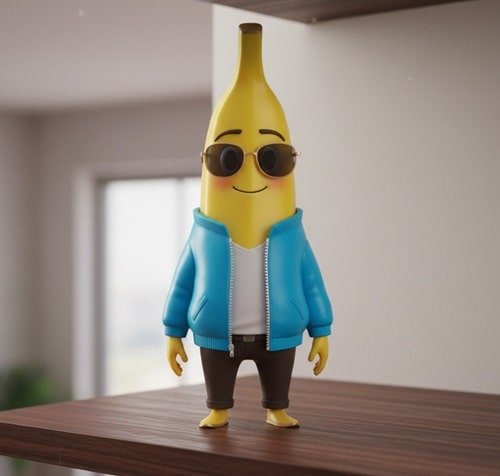
- “Generate a 3D anime-style figurine of a boy in a blue jacket, smiling, on a wooden shelf.”

Nano Banana 3D Figurine
Vintage/Bollywood Style Portraits
- For retro, cinematic looks or 90s Bollywood aesthetics.
- “A vintage Bollywood portrait of a woman in a chiffon saree, warm lighting, grainy texture, 1990s style.”

Nano Banana Bollywood Style Portraits - “Classic 90s film-style portrait of a man in a traditional kurta, soft focus, sunlit background.”

Fantasy/Anime Characters
- “Turn this photo into an anime character with spiky hair, glowing eyes, in a magical forest.”
- “Generate a cinematic fantasy portrait of Elsa from Frozen, detailed lighting, snow effects.”

Nano Banana Fantasy Character

Cinematic/Movie Scenes
- “A man sitting on a rooftop at sunset, cinematic lighting, city skyline in background, film grain effect.”
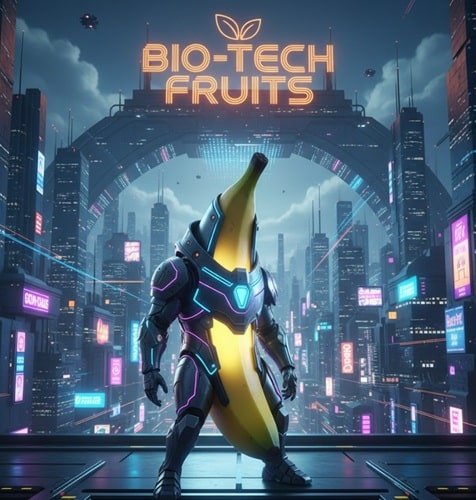
- “A 3D realistic sci-fi scene with a woman in futuristic armor, glowing neon city behind her.”

Nano Banana Sci-Fi Look
Multi-Image Fusion Prompts
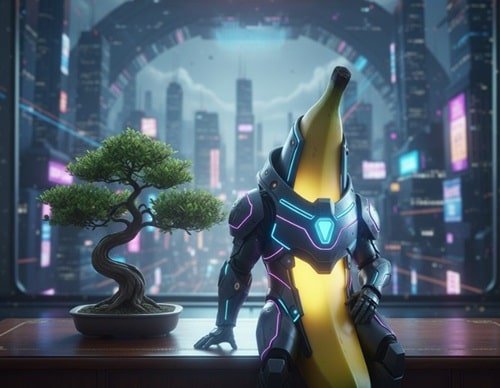
- “Combine these two photos: a cat sitting on a desk and a small bonsai tree on the left, create a cohesive scene.”

Google Gemini Nano Banana Combined Photo - “Fuse this selfie with a mountain landscape background, realistic lighting, maintain facial features.”
Create Your Own Prompt
If you want to try some of your prompts. Keep the following few things in mind:
- Write style, scale, lighting, and environment.
- Use words like realistic, cinematic, vintage, glowing, detailed.
- Include action or pose.
- Mention Camera/Art Styles.
Try your creativity and play with different prompts with Nano Banana.
Advanced Editing Capabilities of Google Gemini Nano Banana
Beyond generating stunning images from scratch, Google Gemini Nano Banana excels in advanced editing features. Users can modify existing images effortlessly. Want to change a character’s outfit, hairstyle, or even facial expression?
Nano Banana makes it possible with just a descriptive prompt. This eliminates the need for professional photo-editing software or expertise.
Whether it’s for personal avatars, game assets, or social media content, the tool adapts to your creative vision quickly.
One of the unique features is background manipulation. You can replace, blur, or enhance the background while keeping the main subject intact.
This is perfect for creating marketing visuals, cinematic shots, or product mockups. Additionally, users can add new elements to existing images, such as props, lighting effects, or animated elements, creating a highly personalized output.
Collaboration and Integration
For creative teams, Nano Banana supports collaborative workflows. Teams can share prompts, generated images, and iterations directly within the Google AI Studio interface.
This makes it easier to maintain a consistent style across projects. Moreover, developers can integrate the API into apps, websites, or AR/VR experiences, expanding the possibilities beyond static images.
This flexibility is especially valuable for startups, content creators, and agencies that require automated or batch image generation.
AI-Powered Realism and Creativity
The Gemini Nano Banana model leverages Google DeepMind’s cutting-edge AI algorithms, ensuring images are not only high-resolution but also contextually accurate.
Lighting, shadows, textures, and reflections are intelligently generated, giving a natural and immersive feel.
Whether creating fantasy landscapes, anime characters, or realistic 3D miniatures, the AI understands artistic styles and generates professional-grade visuals with minimal input.
Security and Copyright
Google has also addressed security and ethical concerns. Every image generated includes an invisible digital watermark to ensure proper attribution and prevent misuse. Users retain rights to their creations, making it suitable for both personal and commercial projects.
Getting Started and Tips
New users should explore Nano Banana by experimenting with various prompt structures. Combining style, environment, lighting, and subject details yields the best results.
For example, specifying a “soft morning light with cinematic shadows” can dramatically enhance realism. Additionally, the tool encourages creativity, try mixing genres like vintage portraits with futuristic elements or realistic anime with natural landscapes.
With its combination of accessibility, advanced AI, and endless creative possibilities, Google Gemini Nano Banana is quickly becoming a must-have for creators worldwide, revolutionizing how we visualize and edit digital imagery.
read more articles like this :